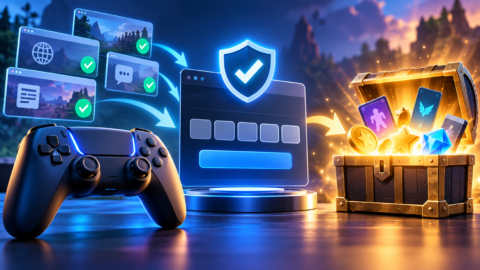

To host a Gimkit game, log in to your teacher account at gimkit.com, click the green Play Live button next to a kit, choose a game mode and its options, and open the lobby. Students join at gimkit.com/join with the game code, and you click Start Game when everyone is in. The whole thing takes about a minute once your kit is ready.
This guide walks through each step, explains how students join, and covers what you get free with Gimkit Basic versus Gimkit Pro. Steps and prices come from Gimkit’s Help Center, checked on 27 October 2026.
Before you start: make a kit
In Gimkit, a set of questions is called a kit, and your kits appear in your dashboard. Each game is a kit played in a particular mode, so the same kit can be reused across many different games. Build and check your kit before class so hosting takes seconds.
How to host a live Gimkit game
- Select a kitIn your dashboard, click the green Play Live button to the right of the kit, or use Play Live from inside the kit.
- Choose a game modeIn the Mode Picker, click Learn More to read about a mode. When it’s outlined in yellow, click Continue.
- Set the game optionsChoose how the game ends, usually a time limit for 2D games, plus the other options for that mode, then click Continue.
- Open the lobbyA Lobby tab opens with your game code. Hover over the code to show a QR code, or click it to copy a join link.
- Start the gameWhen students are in, click Start Game. You can end early with the End Game button, or add time by clicking the time left, up to 59 minutes in total.
How students join
Students have three ways in, according to Gimkit’s join guide:
Go to gimkit.com/join and type the code from the teacher’s screen.
Scan the QR code that appears when the teacher hovers over the game code.
Open the link the teacher shares, which skips typing a code.
If you use Gimkit classes and students are logged in, they join automatically. With the Nickname Generator on, students approve a generated name instead of typing their own. That’s a simple way to avoid silly or unkind nicknames.
“gimkit host” vs “gimkit join”
Teachers host from their dashboard at gimkit.com. Students join at gimkit.com/join. There’s no separate “gimkit host” website, so be wary of look-alike pages using that name.
Gimkit Basic vs Gimkit Pro
| Gimkit Basic (free) | Gimkit Pro | |
|---|---|---|
| Price | Free with an educator account | $14.99 a month, or $59.88 a year |
| Live games | Featured modes, with unlimited students | All modes, including Pro Exclusives |
| Pro Exclusive modes | Limited to 5 players | No Pro Exclusive player cap |
| Assignments | Not included | Included |
| Question media | Standard | Image uploads and audio questions |
| Classes and reports | Included | Included |
The annual plan is the better deal if you’ll use Gimkit for more than four months a year: $59.88 works out at about $4.99 a month. Gimkit’s Help Center also describes department and school licences for groups of teachers. Ask your school before paying personally.
Tips for a smooth game
- Test the kit in a mode yourself before class.
- Use the Nickname Generator to keep names appropriate.
- Project the QR code for in-room classes; it’s faster than typing codes.
- Start with a short time limit and add minutes if the class is engaged.
- Review the post-game report to see which questions need re-teaching.
Also using Blooket? See our Blooket guide for how its hosting and joining compare.
Our verdict
Bottom line
Hosting Gimkit is quick: Play Live on a kit, choose a mode, set the goal, share the code, QR or link, then Start Game. Students join at gimkit.com/join. Gimkit Basic is free with unlimited students in featured modes, and Pro ($59.88 a year or $14.99 a month) unlocks every mode, assignments and media questions.
Steps and prices were checked on 27 October 2026.
Common questions
How do I host a Gimkit game?
In your dashboard, click the green Play Live button next to a kit, choose a game mode, set the game options and continue to the lobby. Share the game code, QR code or link, then click Start Game.
How do students join a Gimkit game?
Students go to gimkit.com/join and enter the game code, scan the QR code on the teacher's screen, or open the join link the teacher shares. Logged-in students in a Gimkit class join automatically.
Is Gimkit free?
Yes. Gimkit Basic is free with an educator account and lets you host featured modes with unlimited students, set up classes and collect reports. Pro Exclusive modes are limited to 5 players on Basic.
How much is Gimkit Pro?
Gimkit Pro costs $14.99 a month or $59.88 a year, according to Gimkit's Pro FAQ. Department and school licences are also available.
What does Gimkit Pro include?
Pro gives access to all game modes, including Pro Exclusives without the 5-player cap, plus Assignments and image and audio questions.
How long can a Gimkit game last?
You set the goal when hosting, usually a time limit for 2D games. During the game you can add time by clicking the time left, up to 59 minutes in total.
What is the Gimkit host link?
There's no separate host website. Teachers host from their dashboard at gimkit.com, and students join at gimkit.com/join.